
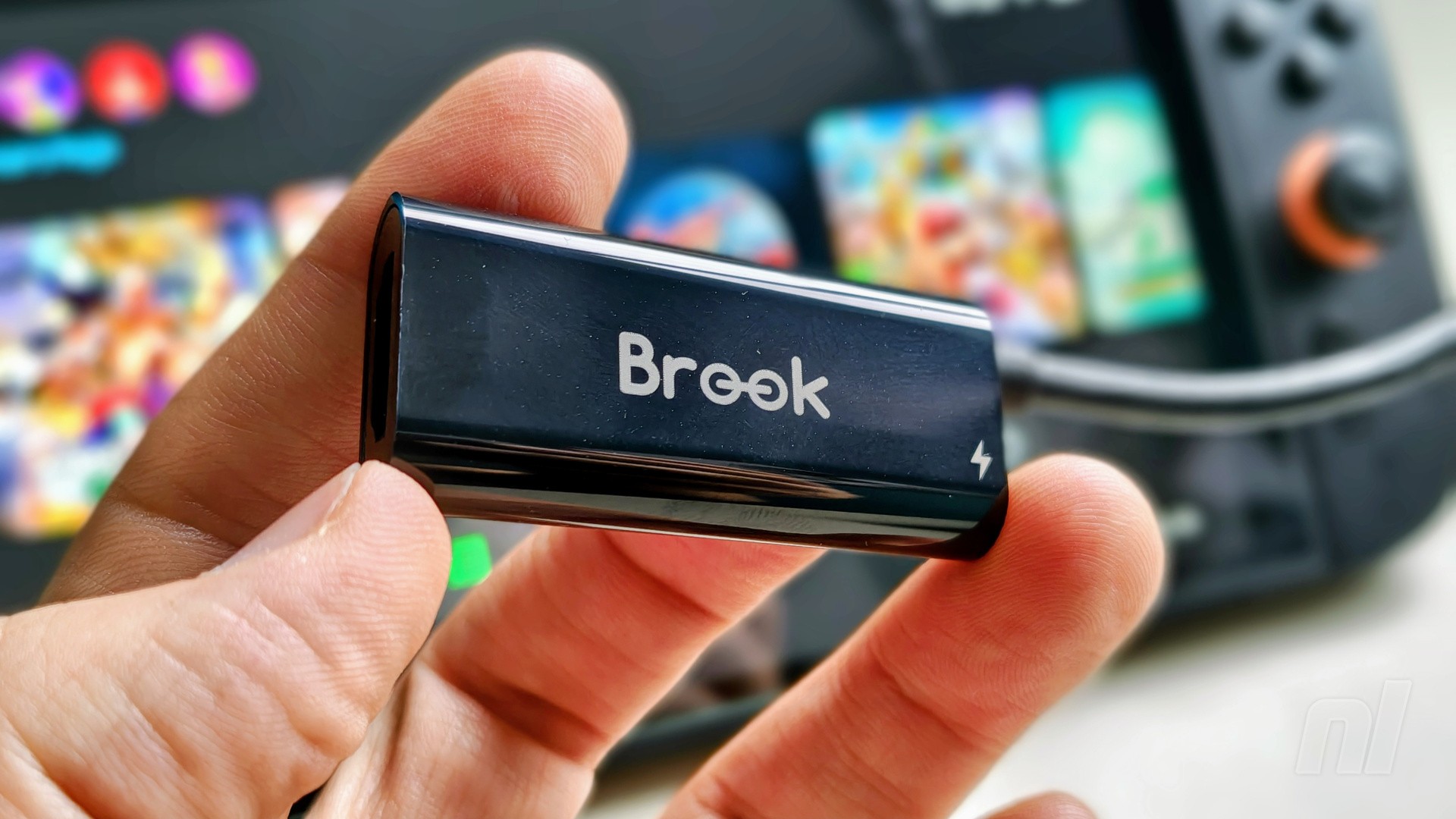
If you're someone who happens to travel a lot for work but you're not keen on packing your Switch 2 dock wherever you go, accessory manufacturer Brook may have the answer.
The company has just launched a USB-C to HDMI adapter for $24 over on Amazon that's compatible with a wide range of devices. Now, the crucial part here is that the vast majority of HDMI converters are simply not compatible with the Switch 2 – this one is.
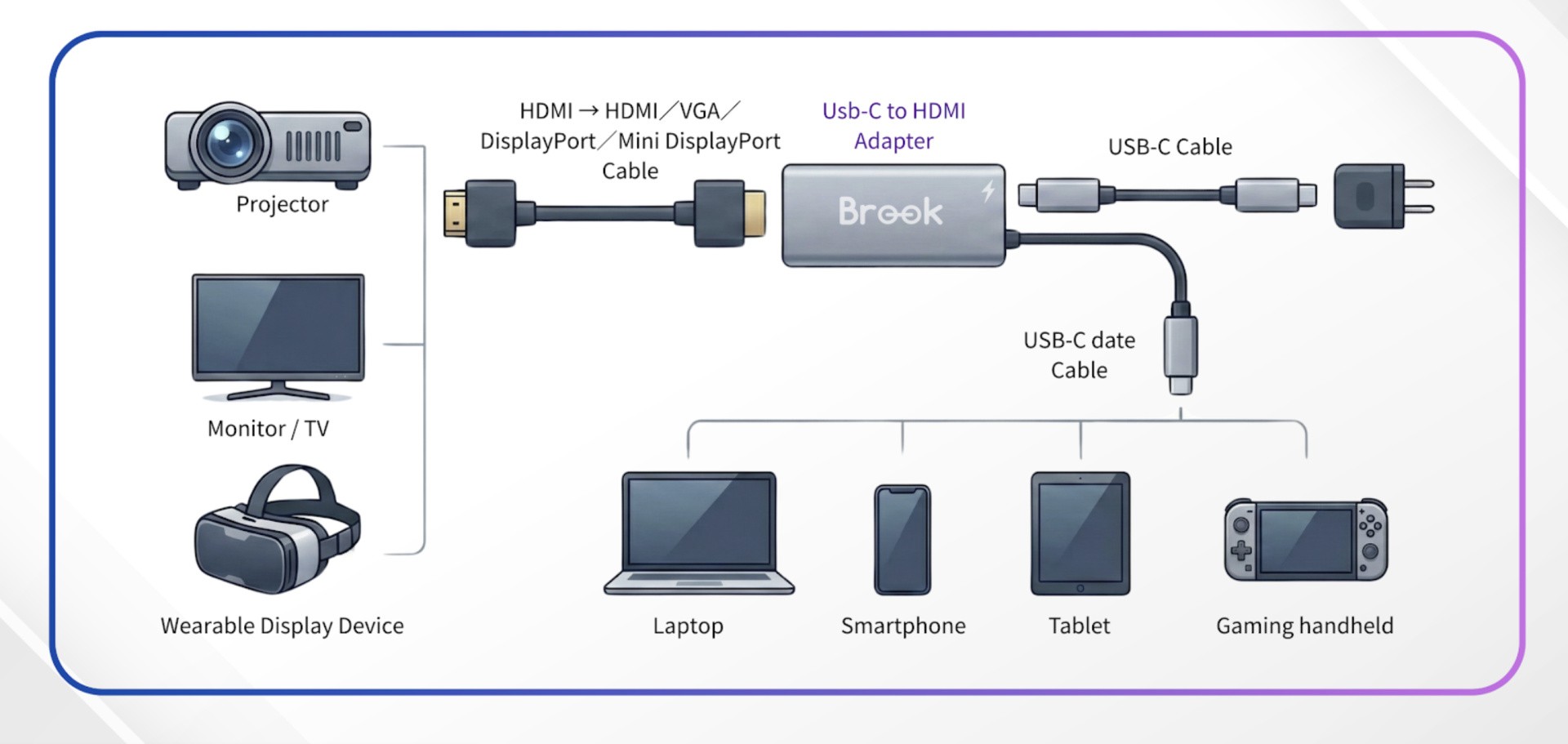
We've tested it out ourselves and can confirm that it hooks up to a 4K LG TV with no issues, but it will also work on devices like projectors. It goes without saying that you'll need to make sure you have an HDMI cable handy, while Brook also recommends you use the original Switch 2 AC adapter for power.
It's also worth noting that, in our experience at least, it seems to only connect up if you use the USB-C port on the bottom of the Switch 2, i.e. the one that plugs into the dock. If you try and use the port on the top, it's likely you won't get any kind of signal.
Regardless, it's a solid option to free up some space in your rucksack or suitcase if you're holed up in a hotel somewhere and fancy some 'docked' gaming. Or, of course, it could work wonders if you have multiple TVs in your house, but only one dock.
Please note that some external links on this page are affiliate links, which means if you click them and make a purchase we may receive a small percentage of the sale. Please read our FTC Disclosure for more information.
Is this something you're likely to make use of? Let us know your thoughts with a comment down below.


Comments 45
If available also here in Italy I'll keep it in mind in case I ever need a simpler "dock" for travel (at home I'll definitely keep on using the official one also for the Ethernet connection and the GameCube adapter) - I've seen a similar one at my sister's house and yep, that worked well, too!
I can’t believe Nintendo kept overall same dock design from the original…. It’s a garbage design.. did not they learn from Switch 1 that people prefer an open deck design easier to place Switch into but also more compatible with all types of Switch cases & grips..
Lots of dongles just to make this work
Honestly , this is nice. I don't mind the Switch 2 dock in the slightest - it does it's job, but this is pretty cool from Brook.
I got something like this a few years ago for the original Switch and it works fine for travel. I think it outputs at 720p.
Wont this cause your switch 2 to overheat? The dock has a build in fan for a reason
@Superick Maybe the Switch 2 dock has a fan b/c Nintendo decided the dock needs a front panel to hold the heat in and a back panel to hold the heat in and an ethernet port which probably also generates a little heat?
The whole idea of a dock in 2025 still seems off to me. The Wii U Gamepad let you play on it sending the game from the console to the screen. Seems only logical if they put the Wij U console in your hand as a Switch it could wirelessly send the picture to a dongle hooked up to your tv.
But ok that was almost a decade ago, tech has advanced. Did the Switch 2 need a dock? This device means obviously not. But should it even need a wire? I play my $350 iPad (A16 11th gen whatever it's called) on my TV wirelessly. No dangle. Smart tvs with Airplay just accept it. I use my PS5 controller on Bluetooth b/c games aren't meant to be played with a touchscreen.
So if an Apple iPad can play wirelessly on a TLC why can't Switch 2 play to a dongle?
That's... wow, that's an amazing alternative! Especially considering how expensive first party docks are. Would certainly make travel easier too. I'll have to consider this
@Superick This is where people get into semantics and tell you the dock's fan prevents the dock from overheating and not damaging the console nestled within it. The bottom line is the dock prevents the console from overheating. And when you're playing a game like Resident Evil Requiem docked, it's a higher resolution and will generate more heat/power consumption. As much as I'd like to have one of these for convenience, I'm not going to risk it unless Nintendo officially confirms a third party dock is safe.
Hmmm, could this lead to potential overheating issues on the Switch 2?
People scaremongering about this device having no fan seem to forget that you could just blow an endless stream of air from your mouths, or even your backsides if you were talented enough, onto the Switch 2. Problem solved. Try harder, people.
I'd get one of these, but I'm scarred by stories from years back when people bought such things and then they became useless after a Nintendo firmware update.
@rjejr In my experience wireless screen sharing always has either bad latency, poor image quality or both. Wii U made it work since it was a custom solution but also because it was 480p. And even then, it had a pretty poor range in my experience, sometimes losing signal only a few meters away.
Anyway, if you wanted to stream 4K image to a TV, it would be over 20 times the amount of pixels as Wii U's GamePad (and that's before taking HDR into account which would increase bandwith requirement further). Even with 2026 tech, that would be very difficult, unless you wanted to have a noticeable macroblocking caused by low bitrate.
@mattmanforever
The dock’s fan is to protect it’s board by removing heat transferred to it from the console along with the own heat it generates, there’s nothing about the cutouts on it and the console that would be effective at having it provide extra cooling.
@ROBLOGNICK No The only reason the S2 dock has a fan is to cool ITSELF off. Not the console itself. The S2 dock generates heat when in use, more than the S1 did.
It does amuse me how many people in this comments section are terrified of their S2 overheating without the fan on the S2 dock if they use this…heck, Nintendo themselves said in their little Welcome Tour thing that the fan was NOT to keep the console cool, it does that just fine by itself with its own blower system.
Edit: yes, I’m aware not everyone has the welcome tour. I sure don’t!
@Olliemar28 is this only in the USA mate?
@BaldB3lper78 Should be on Amazon UK too
@dskatter I'd have to check the official figures on this once available, but I'm not 100% certain that absolutely everyone has experienced the Welcome Tour. To be fair.
@gcunit This is true, but this info about the dock has been shared numerous times since it was released.
Yeah.. I don't want my expensive Switch 2 te overheat. Also while travelling I play handheld. (when at home as well)
A slightly smaller device isn't worth it when it could be locked out with a future firmware update. I already have the dock, I know it'll work 100% of the time, and it's really not that big to put in a suitcase when I travel. If I'm traveling for work long enough to where I want tv play, then I'm going with a full size suitcase anyway.
@gcunit Finally a voice of reason! People, calm down with the fear mongering already. It'll be OK.
Modern CPUs are designed to throttle long before they reach unsafe temps. The purpose of the fan in the dock is to maintain a temperature range the Super Switch (what Nintendo should've called it) can operate in without throttling. In other words, keep it cool enough to run at full performance.
Removing the fan from the equation may lead to CPU throttling if gameplay results in sustained high temps. But it's not going to melt your Switch. It'll be fine. Relax.
The dock is such a handy thing to just "drop" the console in. I find connecting a dongle or even just a cable more cumbersome. But I get how lighter it is to travel with a dongle. Since the S2 is also a great handheld, I wouldn't bother with any of these. But nice to know and good for people who need it!
@KoopaTheGamer "Wii U made it work since it was a custom solution"
A custom solution that Nintendo made 15 years ago. They couldn't come up with a new and improved dongle tech in 15 years?
"sometimes losing signal only a few meters away."
How far away do you sit from your TV where more than a few meters isn't enough?
"stream 4k image to a TV"
Are a lot of Switch 2 games 4k? I thought they were mostly upres lower resolution stuff. I think even a lot of PS5 games are still 1080p in performance mode. I'd accept 1080p wireless.
I know latency is always a concern w/ hard-core gamers, my kid won't even use a wireless controller, but wireless HDMI tech has been a thing for awhile now, I feel like Nintendo could have figured it out.
And even if they didn’t, just an a mini-hdmi port to the Switch 2. Or sell this.
Nintendo putting a patch so this doesnt work and bricks the console in
3......
2......
1......
@Superick I noticed that when I was using my Switch 2 with an adapter, so not with the official dock, I would sometimes experience slow motion. This happened with Pokémon Z-A, but with the official dock, it never happened.
Mmm 🤔 I wonder if you could use this dongle to play on an ipad pro?
is it really fearmongering? didnt 3rd party docks brick Switches in the early days?
@-wc- Yeah, 3rd party docks bricked Switches due to firmware updates. The other concern is these docks regulate power consumption, which I don't trust (some reviewers on Amazon have said their 3rd party docks failed to charge the S2 because of this). I couldn't care less if other people are willing to risk their S2 on a cheap third party dock, but I'm not gonna do it.
@Skert_Gallant I suspect not. Not sure I’d risk trying it as the switch had to be fully plugged in to power so maybe the 2 devices would just not be compatible. Would be cool if it could though.
>Instruction diagram made in IA
I'd rather wait for a reliable company releasing this type of accessory
@rjejr Mini-HDMI is one of the weakest ports you can have. They break really easily. But Nintendo could indeed make a USB-C to HDMI adapter. But that won't cool down the console like the Switch 2 Dock does. And it would not secure the system. I don't think Nintendo would want to have to handle warranty claims because the Switch 2 broke because the exhaust holes were blocked. So Nintendo making something like this.. 0 chance of ever happening.
And on the wireless streaming. Ofocurse it could happen with a specialised dongle. But that would have THE SAME ISSUES, of the system overheating because of a blocked fan intake. On Wii U this wasn't an issue, since the GamePad did not have any processing of it's own. (so no real heat build-up) unlike the Switch and Switch 2.
If Nintendo put out a dock that works on switch 1 and 2 I would buy 4 or 5 on day 1.
Reassuring to see their diagram says "USB-C date cable". Hopefully it won't brick every Switch 2 in a future update. (Or is it updata?)
This will be handy for travel and something I've wanted for a bit as someone who has to travel to conventions for work frequently.
But I also feel like I misunderstood one of the only people that actually likes the original dock
I'm pretty sure the core reason for the dock, from Nintendo's perspective, is two fold:
1. To maintain a clear and unambiguous distinction between "Docked Mode" and "Handheld Mode" in the eyes of the nontechnical user
2. To ensure, as much as possible, that the Switch is arranged in a position to properly cool itself when in Docked Mode
That latter especially is important, and why "But the dock doesn't cool the unit!" misses the point. Its not there to cool the unit. . . but it is there to ensure the console is mounted in an upright position with at least a degree of open air around it. As opposed to, say. . .laying down on a surface, or worse. Because make no mistake, if "Docked Mode" only required plugging in a HDMI cable and flipping a digital mode switch, you would absolutely have tons of people just sitting their Switch on whatever surface is convenient. And some of them would be stupid enough to throw a blanket on top.
Just get a legit one from ebay. No issues, no brainer.
@disappointedMii They created both docks so the Switch 1 & 2 could become a home console, not a game stick. When the Switch 1 & 2 got inserted to their dock, they no longer use the battery inside the console but the power adapter that is plug into the dock.
@disappointedMii You created an account on here just yesterday to make a comment that you can't believe that Nintendo used the same design of dock.... that sold with over 150 million Switch 1 units?
I mean... maybe they also should have second guessed the whole project and instead went and created a Gamecube 2 or aim to copy the great Xbox Series X success?
The whole design and creation of the Switch 2 with the sameish dock and aiming for backwards compatibility with the Switch 1 software so much was so that customers would continue to love the System which has been a roaring success for the last 9 years.
That’s a tiny device and a really good idea. I have had the stage where I carry my gaming device around with me and I want my kit bag to be as small as possible and this converter would help with that so much.
Does that mean I can take my toaster away with me now on business trips or have I misunderstood?
@Serpenterror u completely missed the point of my comment..
@Stormcloudlive why are u getting so defensive and again missing the point of my comment.. an open dock design..
An yeah I just made an account recently .. so only people who made an account 15 years ago have viable opinions
I guess I must wait for 5+ years to criticize Nintendo in anyway…
But why when a $15 USB-C dock works great? I have one for travel and it works well with the only issue being HDR and 5.1 audio output... I just turn the HDR off and output stereo, which is a very acceptable tradeoff for a tiny dock when traveling. Especially since my travel playing environment will likely not allow proper HDR and 5.1 audio anyway.
Or is this thing just a USB-C dock?
And yes, Nintendo should have made the Switch 2 Dock MUCH more travel friendly... At a minimum, give us the option to buy a nice, portable, 100% compatible Travel Dock.
Yeah, still no. Buy a 3d printed conversion kit (shell) and make your "travel dock" only with OEM innards. Pricey but guaranteed safe and never to be bricked or brick your console.
No longer for sale on amazon
Show Comments
Leave A Comment
Hold on there, you need to login to post a comment...